Interview guide
AI Interview Assistant Desktop App vs Browser Extension (2026 Guide)
Desktop app vs browser extension for AI interview assistants in 2026: audio capture, latency, screen sharing, stability, privacy, pricing, and which setup is safer for live interviews.
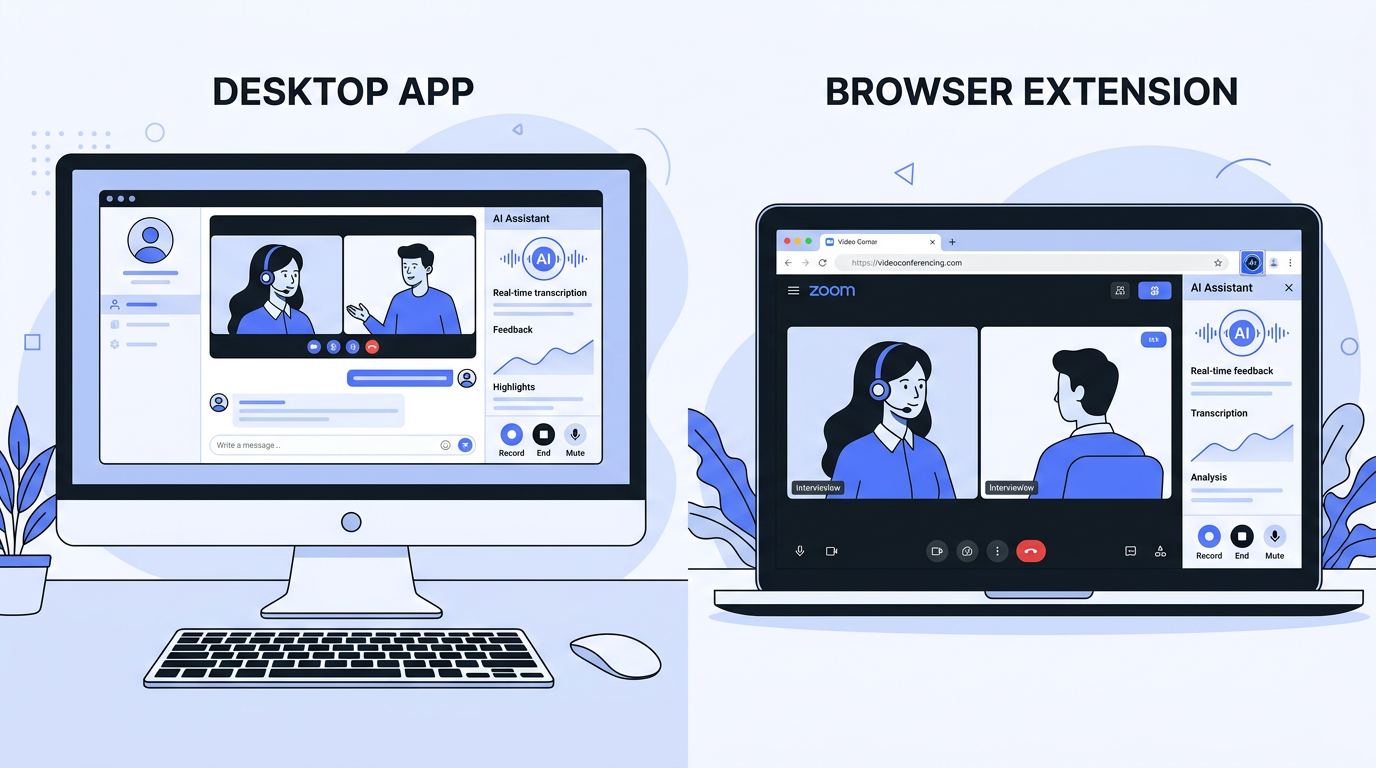
An AI interview assistant desktop app is a native program that runs outside the browser, while a browser extension AI interview assistant lives inside Chrome or another browser and depends on that environment for permissions, overlays, and audio routing. In practice, the difference matters most in live interviews: desktop apps usually offer stronger audio capture, steadier performance during long calls, and fewer browser-related conflicts, while extensions usually win on speed of setup and ease of testing. Candidates searching this topic often want a direct answer about reliability, privacy, screen sharing, and whether a simpler setup is good enough. The short answer is that desktop apps tend to be better for high-stakes live sessions, but browser extensions can still be useful for practice, low-friction trials, and fast experimentation before you decide whether a heavier setup is worth it.
Quick Answer
- Choose a desktop app if your priority is live interview reliability, cleaner audio capture, and fewer browser conflicts.
- Choose a browser extension if your priority is quick setup, lightweight practice, and testing without installing a separate app.
- Expect desktop apps to perform better in long Zoom, Meet, or Teams calls where latency and stability matter.
- Expect extensions to be more sensitive to permissions, browser tabs, and screen-sharing mistakes.
- Use AI for preparation first whenever ethics, employer policy, or live detection risk is unclear.
Why this keyword matters now
This topic sits at the intersection of several high-frequency search intents: ai interview assistant, ai interview helper, and newer decision-stage queries about which delivery format works better in real interviews. Competitors are actively publishing around the same question. Final Round AI recently pushed a dedicated article comparing its desktop app with its Chrome extension, while Interview Sidekick has been publishing adjacent pieces around live AI interview tools, affordability, and undetectable workflows. That signals a strong commercial content opportunity, because users who search for setup comparisons are usually closer to choosing a tool than users who search only for general definitions. For Uhired, this is also a strategic fit: the brand can differentiate by shifting the discussion away from extension-versus-desktop hype and toward a preparation-first, mobile-first workflow that reduces setup friction while still helping users improve answer quality.
Desktop apps and browser extensions solve different problems
The biggest mistake candidates make is assuming the two formats are interchangeable. They are not. A desktop app is designed for deeper access to your computer's audio and display environment, which can improve responsiveness during a live interview. A browser extension is designed for convenience and speed, which can make it better for lightweight practice sessions or users who do not want to install new software. The right question is not which one is universally better, but which workflow matches the way you prepare and interview. If you mostly rehearse answers, generate likely questions, and refine STAR stories, an extension or mobile-first experience may be enough. If you plan to run a live copilot during long, technically complex calls, desktop architecture usually creates fewer obstacles.
Desktop app strengths
- More reliable audio routing for system sound plus microphone input
- Better stability in long interview sessions
- Less dependence on one browser, one tab, or one extension state
- Stronger fit for users who prioritize live call performance
Browser extension strengths
- Fast setup with less installation overhead
- Easier for quick product trials and first-time experimentation
- Convenient for browser-based practice flows
- Often paired with generous freemium distribution models
Audio capture and answer quality: where desktop apps usually win
Real-time AI quality depends on how accurately the tool understands the question, and that starts with audio capture. A desktop app can often access system-level audio paths more consistently than a browser extension, which helps when an interviewer speaks quickly, uses a non-standard accent, or asks layered follow-up questions. Browser extensions work inside a permissions sandbox, so their performance can vary depending on whether the interview is running in the same browser, a different browser, or a native meeting app. Even small capture problems can degrade answer quality because the AI may miss qualifiers, constraints, or the second half of a multi-part question. If your interviews are high stakes and the product is supposed to react in seconds, cleaner input is often more valuable than a slightly easier setup. That is one reason many extension-first products also advertise a desktop path as the more serious option.
Screen sharing, visibility, and why this topic creates anxiety
Much of the search demand behind this topic is really about anxiety, not architecture. Candidates worry that an interviewer will see prompts on screen, hear unusual delays, or detect behavior that feels too polished. Browser extensions create extra risk because they operate inside the same visual workspace many candidates already use for the interview itself. One wrong tab share, one visible panel, or one browser notification can expose the setup. A desktop app may reduce some of that visual overlap, but it does not remove employer policy concerns, behavioral detection, or the ethics of using live assistance without disclosure. That is why the safest long-term strategy is still preparation-first. A tool that helps you practice personalized answers before the call can improve confidence and response structure without forcing you to manage visual hiding, screen recording concerns, or last-second technical failures during a real interview.
Stability, latency, and setup friction in real workflows
In theory, the best tool is the one with the smartest model. In practice, the best tool is the one that still works after forty-five minutes of video, multiple follow-ups, a screen-share request, and several open apps competing for memory. Desktop apps often win here because they are built to run independently from a crowded browser environment. Extensions can perform well in controlled demos, but they may become fragile when too many variables stack up: a busy Chrome profile, multiple tabs, tab-specific permissions, audio routing conflicts, and the meeting tool itself. Setup friction cuts the other way. Extensions are easier to test in ten minutes, which is a real advantage for curious users not ready to commit. The choice often comes down to this trade-off: extensions lower the barrier to entry, while desktop apps lower the barrier to dependable live usage.
Setup
Extensions usually install faster and feel simpler for a first trial.
Reliability
Desktop apps usually handle long sessions and mixed audio conditions better.
Risk
Preparation-first workflows reduce both technical and policy risk more than either live format.
Pricing is not really about format
Many users assume browser extensions should be cheaper because they feel lighter, but market pricing does not work that way. Vendors usually price based on the value of live assistance, the number of sessions, model access, or bundled coaching features. For example, Final Round AI positions its desktop-first Interview CoPilot around live support, practice, and debriefing, while other competitors differentiate with freemium access, language support, or generous daily limits rather than a specific delivery format. That means you should compare actual value levers: monthly price, live session caps, practice mode quality, whether resume-based personalization is included, and whether the product supports your interview type. Uhired's value story is strongest when users care about affordable personalized preparation, especially with resume-based practice and mobile-first convenience, instead of paying a premium mainly for a live overlay workflow.
How Uhired fits into this comparison
Uhired is most compelling when a candidate wants to improve before the interview instead of gambling on a perfect live setup. Its positioning is different from tools that lead with stealth overlays or browser-based copilot mechanics. Uhired focuses on personalized preparation through resume-based Q&A, role-specific practice, mock interview support, and an accessible price point. That makes it especially relevant for users searching broader head terms like AI interview assistant or AI interview helper but feeling uncertain about live-use ethics or setup complexity. If you still want a product comparison with a live-copilot brand, the most direct next read is Uhired vs Final Round AI, where the differences in workflow and pricing are easier to evaluate side by side.
How to choose the right setup for your interview style
Start with the job you are interviewing for and the format you expect. If your interviews are mostly behavioral screens, recruiter calls, and standard virtual conversations, personalized practice will usually move the needle more than live AI prompts. If your interviews are long technical rounds, multi-panel sessions, or case interviews with screen sharing, then you need to think more carefully about reliability, latency, and visibility. Candidates should also consider where they naturally prepare. Some people live in desktop workflows; others practice in short bursts on a phone between classes, shifts, or commuting. The best tool is the one you will actually use repeatedly. A technically superior setup that you avoid because it feels stressful, expensive, or awkward is less valuable than a simpler tool that gets you five extra practice sessions before the real interview.
- Map your interview format: recruiter, behavioral, technical, case, or mixed.
- Decide whether you want preparation support, live support, or both.
- Test the tool in your actual meeting environment, not just in isolation.
- Prefer the option that reduces failure points, not just the one with the flashiest claims.
- When in doubt, choose a preparation-first workflow and build stronger independent answers.
Bottom line
Desktop apps and browser extensions are not competing only on technology; they are competing on candidate psychology and workflow fit. Desktop apps usually provide better conditions for live assistance because they are less constrained by browser limitations and often more dependable under pressure. Browser extensions remain attractive because they are easier to start with and often feel less intimidating to evaluate. But for most candidates, the highest-return use of AI is still not choosing the stealthiest live setup. It is using AI repeatedly before the interview to create stronger examples, cleaner structure, and better recall when the pressure arrives. If you want to improve outcomes without carrying the same level of technical and ethical risk into the call, a preparation-first tool like Uhired is a more durable bet than optimizing endlessly between extension and desktop mechanics.
Frequently asked questions
Frequently asked questions
| Question | Answer summary |
|---|---|
| Is a desktop app better than a browser extension for an AI interview assistant? | A desktop app is usually better for live interviews because it can access system audio more reliably, stay stable during longer sessions, and avoid some of the browser restrictions that affect extensions. A browser extension is usually easier to install and faster to test, so it can be a good starting point for practice. The better choice depends on whether your main goal is live interview reliability or convenience. |
| Are browser extension AI interview assistants easier to detect? | Browser extensions can be easier to expose during screen sharing because they live inside the browser environment. If a candidate shares an entire screen or the wrong browser window, extension panels, tabs, or prompts may appear. Detection risk also depends on employer policy, meeting software, and whether the tool leaves visual or behavioral traces. A desktop app can reduce some display risks, but no setup removes policy or ethics concerns. |
| Which setup has better audio capture for live interviews? | Desktop apps usually have the advantage because they can work with system-level audio and microphone permissions outside the browser sandbox. That can improve question recognition in Zoom, Google Meet, Teams, and other call environments. Browser extensions depend more heavily on browser permissions, tab context, and meeting setup. In practice, cleaner audio input often leads to better AI suggestions and less lag. |
| Do browser extensions cost less than desktop apps? | Not necessarily. Pricing is usually based on the product's plan, credits, or subscription tier rather than the delivery format alone. Some extension-first tools have generous free tiers, while some desktop-first tools push users to paid plans for live features. When evaluating cost, compare monthly subscription price, live interview limits, practice limits, and whether the tool bundles resume analysis or mock interview features. |
| What is the safest way to use AI for interview preparation? | The safest way is to use AI before the interview for preparation: generate questions, rehearse answers, improve STAR structure, and review weak spots. Pre-interview use lowers detection risk and avoids crossing employer policy lines in a live call. Tools like Uhired are especially useful when they personalize practice using your resume and target job description. That preparation-first workflow gives you the benefit of AI without relying on it to answer for you in real time. |
| Should I choose a mobile-first AI interview assistant instead? | A mobile-first tool is a strong option if you practice on the go, want separation from your interview screen, or prefer a lower-friction workflow. It can also make preparation easier for users who are not always at a desktop. However, if your main use case is desktop-based live interviews, you still need to compare how the product handles audio input, latency, and private prompting in that environment. |
Practice before the pressure starts
Use Uhired to generate personalized interview questions from your resume, rehearse stronger answers, and improve faster without depending on a fragile live setup.
Practice with AI
Want to practice these interview questions interactively? Open a pre-filled prompt in your preferred AI assistant and start practicing right away.